Extra Tools
Discord Webhook Integration for Odoo — Send Sales Orders, Leads, Tickets & Stock Alerts to Discord Channels
Post Odoo records (orders, leads, tickets) to Discord channels.
Discord Notifications for Odoo
Post any Odoo record — sales orders, leads, tickets, stock alerts — straight into a Discord channel, the instant it happens.
Odoo 19.0 · Extra Tools · License: OPL-1 · €10
Author: Bogosort ·
module-support@bogosort.xyz
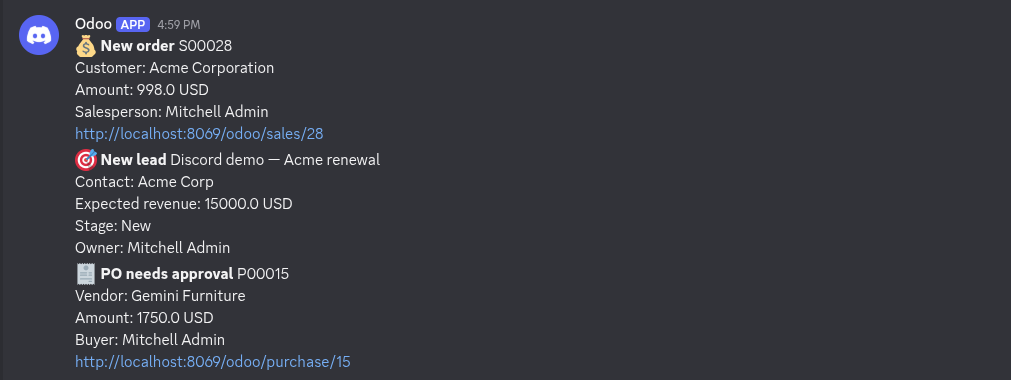
Why this module
Your sales, support and ops teams already live in Discord. This module closes the gap between Odoo and the channels they actually watch: when a record is created, changed or deleted in Odoo, a fully-rendered message — built from the record's own fields — is delivered to the Discord channel of your choice within seconds. No cron polling, no middleware, no Zapier bill. Configure once with a server action and an automation, then forget it.
Key features
- Any Odoo event. Trigger on create, write, unlink or stage change through standard automations.
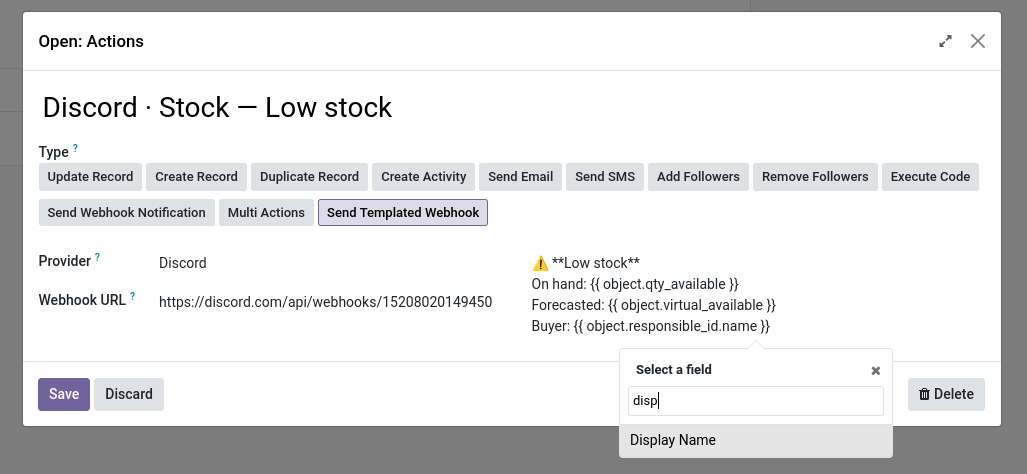
- Dynamic record fields. Insert any field with the
#picker —{{ object.amount_total }},{{ object.partner_id.name }}— rendered at send time. - One action per channel. Point each action at a different Discord incoming-webhook URL.
- Fail-safe delivery. The HTTP call is deferred to after commit and never blocks or rolls back your business flow.
- Safe templates. Like email templates, the message is validated when you save it — a typo never breaks a live order.
- Zero dependencies beyond Odoo. Works on Community and Enterprise; no paid third-party service.
Trigger on any Odoo event
Powered by standard base_automation rules
A webhook action becomes a real-time notifier the moment you bind it to an automation. Create the rule, pick the model and the trigger (on creation, on update, on deletion, on stage change, even time-based), and every matching record fires your templated message into Discord.
| Trigger | Typical use |
|---|---|
| On Creation | “New sales order” alert |
| On Update (field) | Stage changed to Done |
| On Deletion | Audit of removed records |
| On Stage Change | Lead moved to Won |
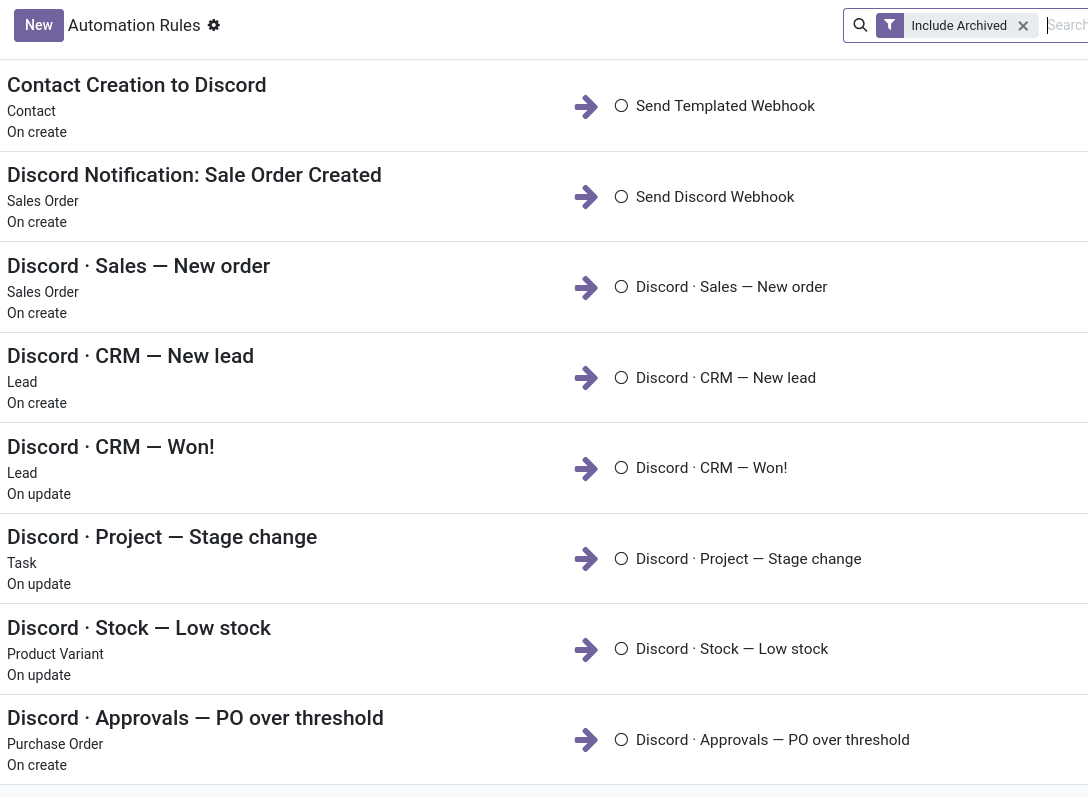
Each rule binds a model + trigger to a templated Discord action.
Dynamic record fields
Type # and pick any field — rendered at send time
The message editor uses Odoo's dynamic-placeholder widget. Type
# and choose from the target model's fields; relations are
followed automatically, so {{ object.partner_id.name }} just
works. Fields are resolved against the live record when the action runs,
so totals, dates and statuses are always current.
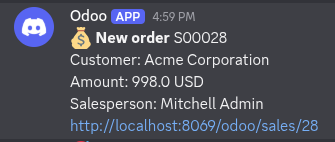
Sales → Discord
Every new quote or order lands in #sales
Notify the sales floor the moment an opportunity converts. A typical message: “💰 New order {{ object.name }} from {{ object.partner_id.name }} — {{ object.amount_total }} {{ object.currency_id.name }}”. Filter by amount to only alert on deals above a threshold.
CRM & leads → Discord
A new lead or a stage change pings the right person
Route inbound opportunities to a #crm channel as they arrive, and fire a separate alert when a lead moves to Qualified or Won. Filter on stage so the channel only hears about the moments that matter.
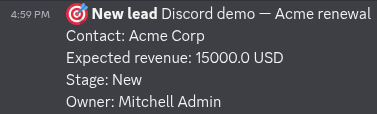
New lead lands in #crm…
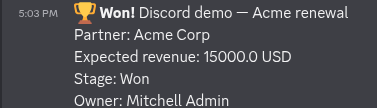
…and a separate alert fires the moment it wins.
Project tasks → Discord
Stage changes keep the whole project in sync
When a task moves to Done, Blocked or Review, post the task and its assignee to the project channel. Trigger on the stage field so the channel follows your board without anyone typing.
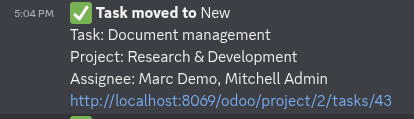
Approvals & finance → Discord
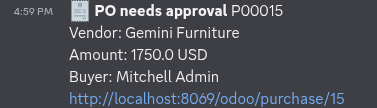
Large POs and invoices surface themselves
Send purchase orders and vendor bills over a threshold to an
#approvals channel so nothing expensive slips through unnoticed. Filter
the automation on amount_total > X and route to the
channel that owns sign-off.
What's new
- v19.0.1.0.0 (2026-06-28): initial release on the Odoo Apps Store — Discord provider for the Webhook Server Action, with dynamic field placeholders, post-commit fail-safe delivery and save-time template validation.
Installation & configuration
- In Discord: Channel Settings → Integrations → Webhooks → New Webhook, pick a name and avatar, copy the webhook URL.
- In Odoo: install Discord Webhook Integration for Odoo from the Apps Store. The bs_webhook engine installs automatically.
- Go to Settings → Technical → Actions → Server Actions and create a new one on your target model (e.g. Sale Order).
- Set Action To Do = Send Templated Webhook.
- Choose Provider = Discord and paste the webhook URL.
- Type your message, using
#to insert fields, then save. - Create a base automation on the same model with the trigger you want (e.g. On Creation) and select this action.
Frequently asked questions
Does it work on Odoo 19?
Yes — Odoo 19.0 Community and Enterprise. Further versions will be
published as separate store pages.
Do I need any paid third-party service (Zapier, Make, IFTTT)?
No. It posts directly to Discord's own incoming-webhook URL — no
middleware, no per-message cost.
Can I send the same record to several channels?
Yes — create one server action per channel and let one automation fire
them all, or bind several actions to the same rule.
What if Discord is down when an order is placed?
Nothing breaks. The send is deferred to after commit and failures are
logged, so your order still saves normally.
Compatibility
- Odoo versions: 19.0 (Community & Enterprise).
- Dependencies: bs_webhook (free, installed automatically) and Odoo's standard base_automation & mail.
- Edition: works on Community and Enterprise.
Support & contact
- Email: module-support@bogosort.xyz
- Free support for 90 days covering installation and configuration.
- Looking for other targets too? Pair this with our other webhook provider modules.
A note on the screenshots
The alerts shown above are examples, not predefined: the module ships with no preconfigured automations or message templates. The server-action type, the Discord provider, the dynamic field picker and the fail-safe delivery are what you install — the specific records, triggers, channels and wording are yours to set up in a few clicks, exactly as described in the installation steps above.